 Sialkot, Pakistan
 Worldwide enquiries

The safest way to prepare a custom team uniform order is to use two controlled documents: an approved size chart and a locked player roster. The size chart defines how every garment is measured and what each size means; the roster assigns the correct product, fit, size, name, number and quantity to each wearer. Keep the two files linked by style code and version, but never combine body measurements, finished-garment measurements and player data in one ambiguous sheet.
Start your enquiry: Email kamran@athleticrush.co or message Athletic Rush on WhatsApp. WhatsApp: +92 327 9008337. Include the product list, quantities, delivery destination and the questions you need answered.
Size Chart vs Player Roster: What Is the Difference?
Buyer checkpoint: The size chart defines the garment; the roster allocates it to a wearer.
A size chart is a product specification. It tells the buyer and manufacturer how a jersey, short, jacket or other garment should fit and be checked.
A player roster is an order-allocation document. It tells production which personalized garments to make and how to sort them.
| Document | Main purpose | Typical information | Approval owner |
|---|---|---|---|
| Size chart | Define fit and measurement requirements | Fit group, size labels, points of measurement, dimensions, tolerances and revision | Buyer plus product-development contact |
| Player roster | Assign garments to wearers | Player name, printed name, number, garment sizes, colourways, quantities and notes | Authorized team or buyer contact |
| Artwork proof | Control visual and personalized content | Logo, font, colours, placements, names and number style | Buyer or brand approver |
| Packing list | Control sorting and dispatch preparation | Player bundle, size bundle, team, carton and quantity references | Buyer and supplier operations contacts |
These documents should agree. A roster marked “Youth M” is incomplete if the approved chart does not contain the same fit group and size label.
Decide Whether the Chart Uses Body or Garment Measurements
Buyer checkpoint: Label body and finished-garment measurements clearly. Never mix them.
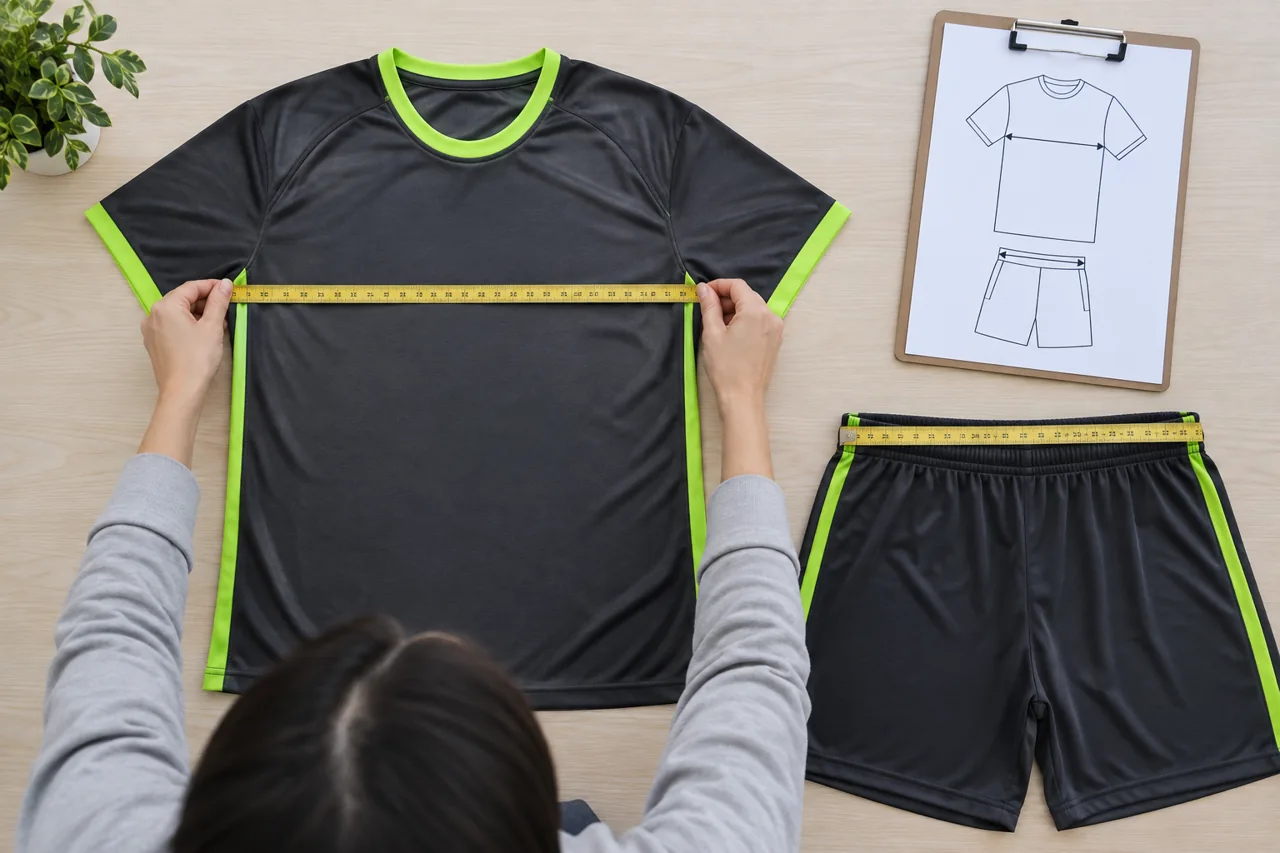
Measure the garment flat using defined points; keep garment dimensions distinct from body measurements. AI-generated educational illustration; not a photograph of actual staff or an approved production sample.
This is the first decision to state at the top of the chart.
Body measurements describe the wearer. They help a player select a size, but they do not directly specify the dimensions of the finished garment.
Finished-garment measurements describe the physical uniform when measured using defined points and methods. They are used to approve a sample and inspect production.
Do not place body chest circumference beside a flat garment chest width without clearly labelling the basis. They are different measurements. Also state whether a garment value is measured flat, around the body, along a curve or straight between fixed points.
For a strong B2B specification, keep a wearer-facing body-size guide and a production-facing finished-measurement chart as separate, named tables.
Build the Team Uniform Size Chart
Buyer checkpoint: Define the measurement method and permitted tolerance for every point.
Start with the exact garment, not a generic “teamwear” chart. Jerseys, shorts, compression layers, tracksuits, goalkeeper products and outerwear require different measurement points.
Include these controls:
| Size-chart field | What to record |
|---|---|
| Product or style ID | Stable code shared by the tech pack, sample and roster |
| Garment | Jersey, short, jacket, pant or other item |
| Fit group | Adult, women’s, youth, goalkeeper or another approved block |
| Measurement basis | Body measurement or finished garment |
| Size range | Only the labels actually offered for that fit |
| Point of measurement | Unambiguous name for each measured location |
| Measurement method | Flat, circumference, straight, curved, relaxed or stretched as applicable |
| Dimensions | Approved values by size |
| Tolerance | Product- and measurement-specific allowable variation |
| Units | Inches or centimetres; avoid mixing units |
| Revision | Version number and date |
| Approval | Named buyer and supplier contacts or recorded approval status |
Define Every Point of Measurement
Measurement names should connect to a diagram or written method. “Length” alone is not enough. Specify the start point, end point and garment position.
Common jersey controls may include chest width, body length, shoulder width, sleeve length, sleeve opening and bottom opening. Common short controls may include waist, hip, front rise, back rise, inseam, outseam and leg opening. The correct set depends on the approved pattern and garment construction.
Measure samples on a flat, stable surface using the agreed method. Close fastenings where the method requires it, smooth the garment without stretching it, and allow elasticated products to relax before recording a value.
Set Tolerances Deliberately
A tolerance is not an extra allowance to change the target measurement. It is the agreed acceptable variation around that target.
Set tolerances by product, material, construction and point of measurement. A critical fit dimension may need different control from a less critical opening or trim measurement. Do not copy one universal tolerance across every garment and size without technical review.
Use Separate Fit Blocks Where Needed
A larger or smaller size is not always an appropriate substitute for a different fit.
Create separate approved charts when the order includes materially different:
- Adult, women’s or youth patterns
- Goalkeeper or equipment-compatible fits
- Compression and relaxed-fit garments
- Match, training and supporter products
- Jerseys, shorts, outerwear and accessories
Each roster row must refer to the correct fit block. Labels such as “M” are not universal across suppliers, patterns or product types.
How to Collect Player Sizes
Buyer checkpoint: Check each garment and fit group before choosing a size.

Use sample fitting and movement checks before recording each player’s garment sizes. AI-generated educational illustration; not a photograph of actual staff or an approved production sample.
Use physical size samples made to the proposed or approved fit whenever possible. A generic retail garment may not represent the production pattern.
Give players simple instructions:
- Choose the relevant fit group first.
- Try the complete uniform, including any normal base layer or protective equipment.
- Check movement during sport-specific actions.
- Select jersey and short sizes independently.
- Record the selected sample size—not a guessed everyday clothing size.
- Escalate special-fit needs before the roster is locked.
Assign one authorized coordinator to collect and verify responses. Multiple informal spreadsheets and message threads create conflicting versions.
Where physical samples are not available, provide the clearly labelled body-size guide, explain how measurements should be taken and record that sizing was selected remotely. The buyer should still verify that the guide corresponds to the exact proposed product and fit.
Create a Production-Ready Player Roster
Buyer checkpoint: Use separate fields for jersey size, short size and quantity.
Use one row per player and garment combination when products, sizes or quantities differ. This structure is easier to audit than placing several garments in one free-text cell.
| Roster field | Why it matters |
|---|---|
| Team or squad | Separates multiple groups in one order |
| Player ID | Stable reference even if a name changes |
| Printed name | Exact text and capitalization for decoration |
| Player number | Preserve intended leading zeros if applicable |
| Garment or style ID | Links the row to the correct specification |
| Fit group | Connects the selection to the right size chart |
| Jersey size | Kept separate from other garment sizes |
| Short size | Prevents forced same-size sets |
| Colourway | Home, away, goalkeeper, training or other version |
| Quantity | Units required for that exact row |
| Decoration notes | Captain mark, sleeve mark or approved exception |
| Approval status | Shows whether the row is final |
| Packing group | Player, team, size or other sorting instruction |
Use data validation or controlled dropdowns for fields such as size, fit group, style and colourway. Free typing invites near-duplicates such as “Youth-M,” “YM” and “Youth Medium.”
Keep Jersey and Short Sizes Separate
Many players need different top and bottom sizes. A roster that records only one “kit size” can cause avoidable allocation errors. Give every independently sized garment its own column or row.
The same applies to training wear, goalkeeper items and outerwear. If the supplier prices or packs a set, the underlying size allocation should still remain explicit.
Control Names, Numbers and Other Variable Data
Buyer checkpoint: Check exact spelling, leading zeroes, duplicates and blanks.
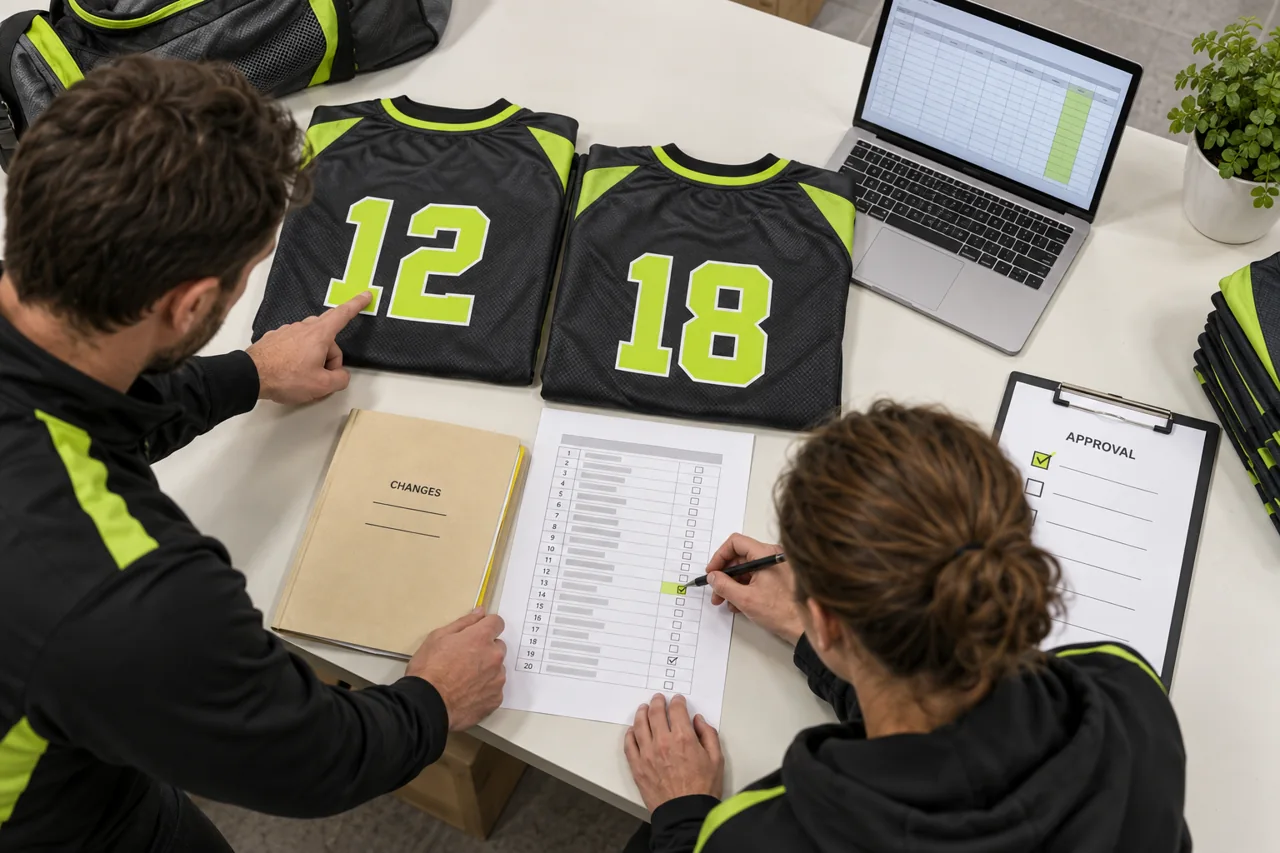
Match the printed number and exact player data to the approved roster. AI-generated educational illustration; not a photograph of actual staff or an approved production sample.
Personalization errors are difficult to hide and may make an otherwise usable garment unacceptable.
Before release, check:
- Exact spelling, capitalization, accents and punctuation
- Whether a blank name is intentional
- Duplicate numbers within the relevant squad
- Leading zeros and number formatting
- Approved font and character availability
- Name and number colour
- Garment and colourway assignment
- Sponsor, competition and captain-mark requirements
- Placement relative to seams, panels and ventilation zones
Treat the approved roster as production data, not as a design suggestion. If a name or number is shown in both the roster and artwork proof, both must match.
For privacy and accuracy, collect only the player information needed to fulfil the order, restrict editing access and agree how obsolete roster versions will be handled.
Manage Home, Away, Goalkeeper and Training Quantities
Do not assume that every player receives the same product mix. One roster may include field players, goalkeepers, coaches, staff and replacements.
A practical allocation should answer:
- Which colourways does each person receive?
- Are goalkeeper garments based on a different style or fit?
- Are match and training sizes the same?
- Does each garment require personalization?
- Are spare unnumbered or numbered units required?
- How should extras be sized and packed?
- Does the order include separate squads or age groups?
Add formulas or a pivot summary to reconcile roster totals by style, size, fit, colourway and quantity. The summarized totals must equal the purchase order and the supplier’s order acknowledgment.
Use Version Control and Approval Gates
Buyer checkpoint: A change needs a recorded revision and acknowledgment before production.
A clear version history prevents an outdated file from returning to production.
Use a naming convention such as:
Club_Season_Product_Roster_Rev03_Approved
Record:
- Revision number
- Date
- Person making the change
- Cells or rows changed
- Reason for the change
- Current approval status
- Superseded version reference
Lock the roster only after the size chart, artwork structure and product list are stable. Define who can approve changes and how the manufacturer should acknowledge a revised file.
A recommended approval sequence is:
- Approve product scope and fit groups.
- Approve measurement method and size chart.
- Complete size sampling or player measurement.
- Approve artwork, fonts and placements.
- Verify roster spelling, sizes and quantities.
- Reconcile totals to the purchase order.
- Issue one locked production version.
- Require written acknowledgment before personalization.
Athletic Rush’s order workflow can be used to identify the approval checkpoints needed for a quotation.
Hand the Files to the Manufacturer
A complete production handover should contain:
- Purchase order or confirmed order summary
- Product and style list
- Approved tech packs
- Approved body-size guide, if used
- Approved finished-garment measurement chart
- Measurement diagram and method
- Artwork files and visual proofs
- Locked player roster
- Decoration placement specifications
- Label and packaging requirements
- Required inspection records
- Named approval contacts
- File version register
Do not send an updated roster as a replacement email attachment without highlighting what changed. Ask the supplier to confirm the active filename, revision and row count.
Use the Roster During Quality Control and Packing
Buyer checkpoint: Reconcile individual allocations as well as the overall total.
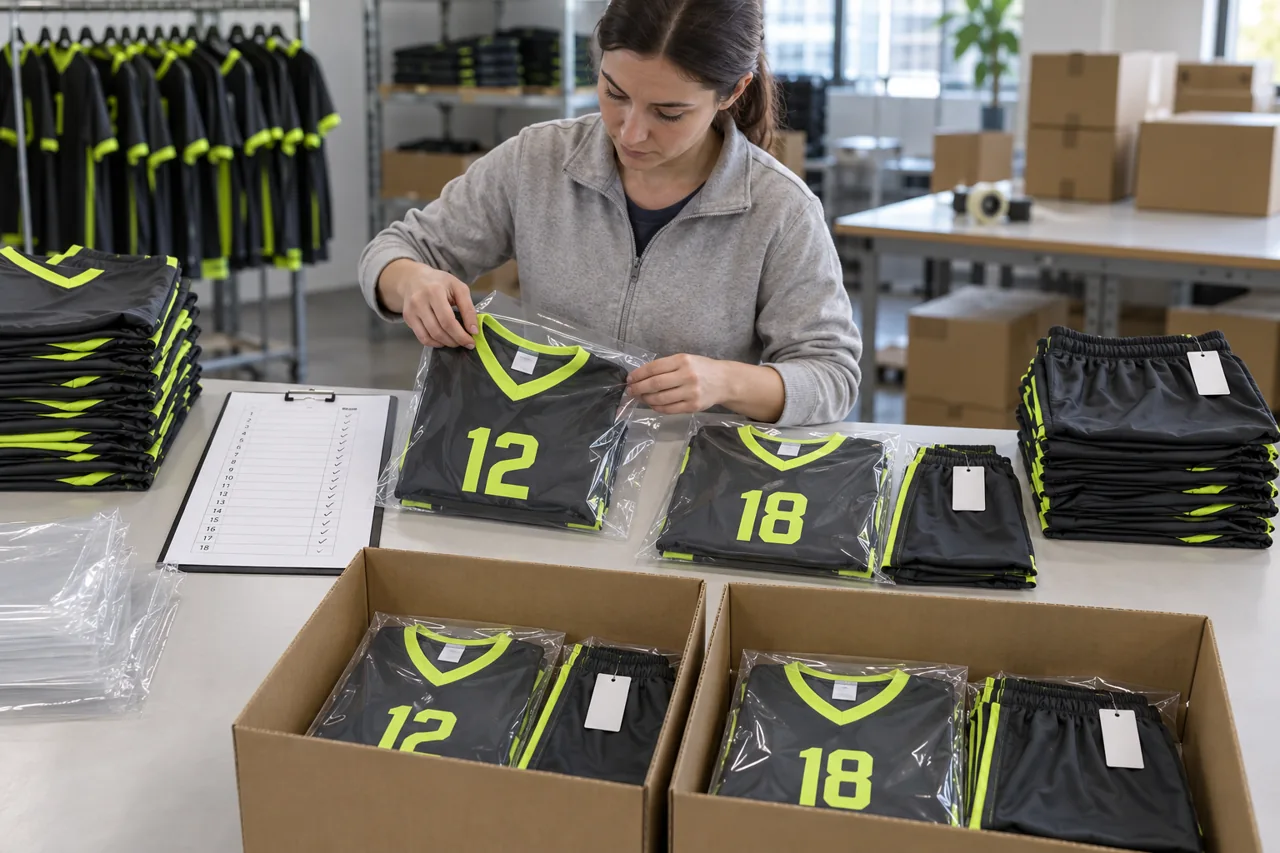
Check each packed jersey-and-shorts combination against the controlled allocation. AI-generated educational illustration; not a photograph of actual staff or an approved production sample.
The roster remains useful after personalization begins. Inspection should compare the physical garments to both the approved product specification and the locked roster.
Checks can include:
| QC checkpoint | Comparison source |
|---|---|
| Garment measurements | Approved finished-measurement chart |
| Fit group and size label | Size chart, label specification and roster |
| Printed name and number | Locked roster and artwork proof |
| Colourway and decoration | Approved sample and artwork |
| Jersey and short pairing | Roster allocation |
| Quantity by size and style | Purchase order and roster summary |
| Player bundle or team pack | Approved packing instruction |
For more detail, review the site’s quality-control overview. Buyers should define the inspection level, records and acceptance rules appropriate to their own order rather than assume a generic check covers every risk.
Plan for Late Changes, New Players and Reorders
Roster changes after approval may affect artwork, production sequencing, inspection and packing. Agree a written change process before the order is released.
Each change request should identify:
- Existing approved revision
- Player ID and affected product rows
- Old and new data
- Requested quantity
- Required artwork change
- Approval owner
- Supplier acknowledgment
- Effect on commercial or production arrangements, if any
For reorders, reference the original approved style, pattern, size chart, artwork and roster convention. Ask the supplier to confirm whether any material, trim, colour, pattern or process has changed before treating a previous sample as the current standard.
Common Size Chart and Roster Mistakes
Avoid these recurring problems:
- Mixing body and finished-garment measurements
- Using one chart for different fits or products
- Omitting the measurement method
- Treating size names as universal
- Recording one size for an entire kit
- Collecting sizes from unapproved retail garments
- Allowing free-text style and colourway names
- Sending names and numbers in separate, conflicting files
- Failing to check duplicate numbers or blank names
- Leaving totals unreconciled
- Accepting changes through informal messages
- Printing from a file that is not visibly approved
- Packing without checking player-level allocation
B2B Buyer Checklist Before Production
Confirm that:
- Every garment has a stable style ID.
- Each fit group has its own approved chart.
- Body and finished-garment measurements are separated.
- Points of measurement and units are defined.
- Tolerances have been technically reviewed.
- Players selected against the correct fit.
- Jersey and short sizes are separate.
- Names, numbers and colourways are verified.
- Roster totals match the order.
- Artwork and roster data match.
- One approved revision is locked.
- The supplier acknowledged the active files.
- QC and packing will use the same roster.
Frequently Asked Questions
Should a team uniform size chart show body or garment measurements?
It can show either, but the basis must be explicit. A buyer-facing body guide helps players choose a size; a finished-garment chart controls sample approval and production inspection. Keep them in separate tables.
Can every player use the same jersey and short size?
No. Record jersey and short sizes separately so each player can receive the correct combination.
What is a point of measurement?
A point of measurement defines exactly where and how a garment dimension is taken. It should state the garment position, start and end points, and whether the value is flat, around, straight, curved, relaxed or stretched.
How should women’s and youth sizes be handled?
Use the appropriate approved fit block and size chart. Do not assume that changing only the size label produces the required proportions.
When should the player roster be locked?
Lock it after product scope, size charts, player sizing and artwork rules are approved, and before personalization or other roster-dependent production begins. Require written acknowledgment of the active revision.
What should happen if a player changes size or number?
Issue a controlled revision that identifies the exact old and new data, affected garments and approval. The manufacturer should confirm whether the change can be applied and identify any effect before work proceeds.
How can buyers reduce name and number errors?
Use one locked roster, preserve exact text formatting, validate duplicates and blanks, compare the roster with artwork proofs, and inspect completed garments against the same approved data.
Should spare uniforms appear on the roster?
Yes. Include spare units as clearly labelled rows, with size, colourway, personalization status and packing group. This keeps all ordered units in the same reconciliation.
Request a Teamwear RFQ Review
A usable RFQ starts with controlled data. Send Athletic Rush your product list, fit groups, draft size chart, player roster, artwork, quantities and packaging needs through the production quote form. Ask for any assumptions, missing fields and approval checkpoints to be identified in writing before sampling or bulk production. Commercial terms, timing and manufacturing capabilities must be confirmed for the specific order and should not be inferred from this guide.
Email kamran@athleticrush.co or message Athletic Rush on WhatsApp. WhatsApp: +92 327 9008337. Include the product list, quantities, delivery destination and the questions you need answered.